> ## Documentation Index
> Fetch the complete documentation index at: https://support.betalented.ai/llms.txt
> Use this file to discover all available pages before exploring further.
# Talent Attraction overview
> Your recruitment dashboard for managing job posts, reviewing candidates, and tracking hiring activity.
The Talent Attraction module is your central hub for recruitment. From here, you can create job posts, review matched talent, invite candidates to apply, and manage your hiring pipeline.
## Dashboard
When you open Talent Attraction, you see a dashboard listing all your job posts with key metrics at a glance.
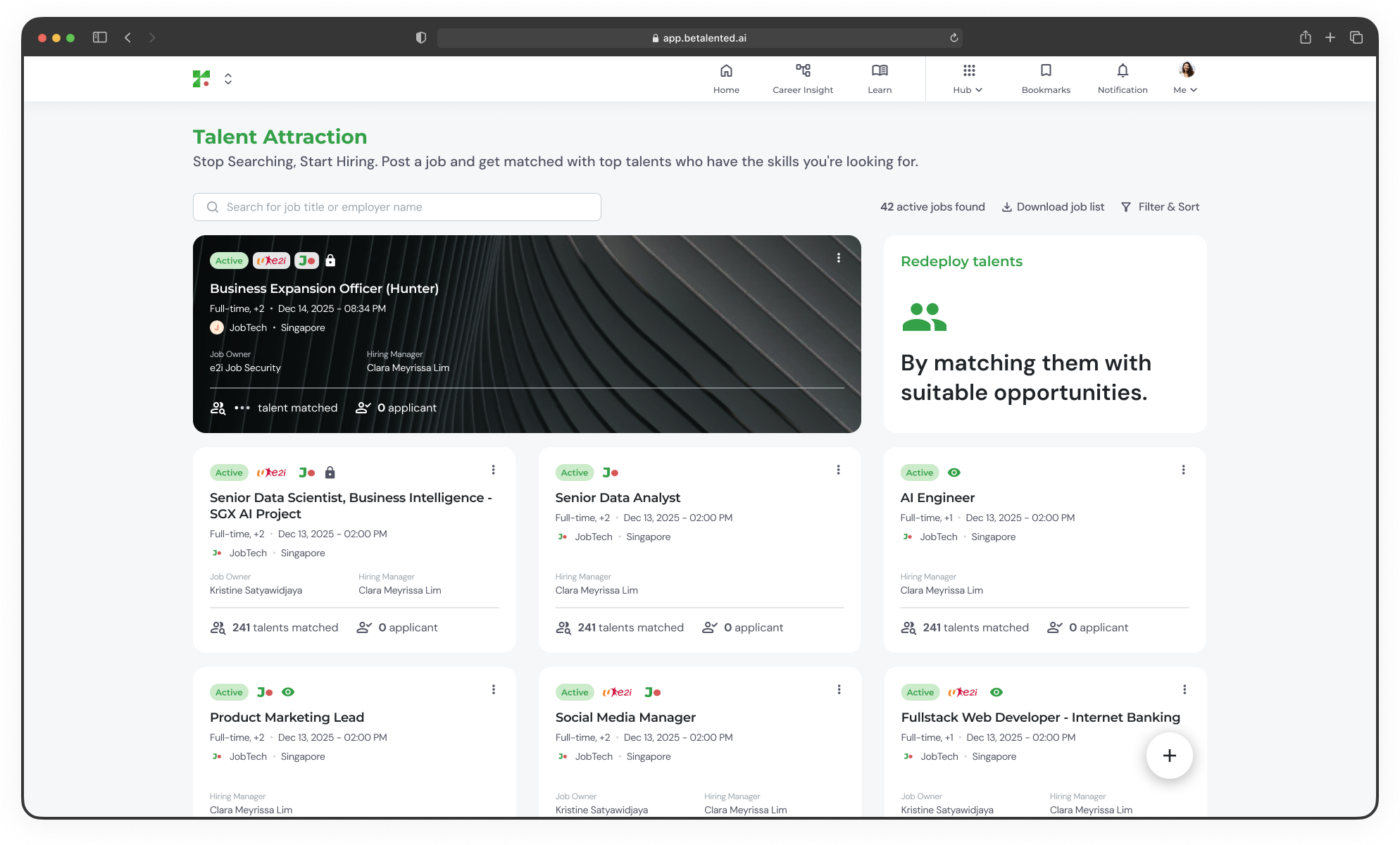 The dashboard displays:
* **Active jobs counter** — Total number of currently active job posts
* **Job cards** — Each card shows the job title, employment type, region, posting date, match and applicant counts, and the assigned hiring manager
* **Status indicators** — Quickly identify which posts are active, pending approval, or inactive
***
## Filtering and sorting
Use the **Filter & Sort** controls to narrow down your view.
Available filters include:
| Filter | Description |
| :-------------- | :----------------------------------------- |
| **Employer** | Filter by company name or UEN |
| **Job Owner** | See posts assigned to a specific job owner |
| **Posted Date** | Filter by date range |
| **Skills** | Find jobs requiring specific skills |
| **Status** | Toggle between Active and Inactive posts |
You can also sort by **Latest** or **Oldest** posting date.
***
## Quick actions
From the dashboard, you can:
Create a new job post with skills-based matching.
Edit, duplicate, extend, or close your job posts.
View matches, invite candidates, and manage applicants.
Export your active job listings.
Click on any job card to go directly to its detail page where you can view matches, invite candidates, and manage applicants.
The dashboard displays:
* **Active jobs counter** — Total number of currently active job posts
* **Job cards** — Each card shows the job title, employment type, region, posting date, match and applicant counts, and the assigned hiring manager
* **Status indicators** — Quickly identify which posts are active, pending approval, or inactive
***
## Filtering and sorting
Use the **Filter & Sort** controls to narrow down your view.
Available filters include:
| Filter | Description |
| :-------------- | :----------------------------------------- |
| **Employer** | Filter by company name or UEN |
| **Job Owner** | See posts assigned to a specific job owner |
| **Posted Date** | Filter by date range |
| **Skills** | Find jobs requiring specific skills |
| **Status** | Toggle between Active and Inactive posts |
You can also sort by **Latest** or **Oldest** posting date.
***
## Quick actions
From the dashboard, you can:
Create a new job post with skills-based matching.
Edit, duplicate, extend, or close your job posts.
View matches, invite candidates, and manage applicants.
Export your active job listings.
Click on any job card to go directly to its detail page where you can view matches, invite candidates, and manage applicants.