> ## Documentation Index
> Fetch the complete documentation index at: https://support.betalented.ai/llms.txt
> Use this file to discover all available pages before exploring further.
# Help
> Access support resources, search the knowledge base, and submit feedback
The Help section provides self-service support and a direct channel to the support team.
## Accessing help
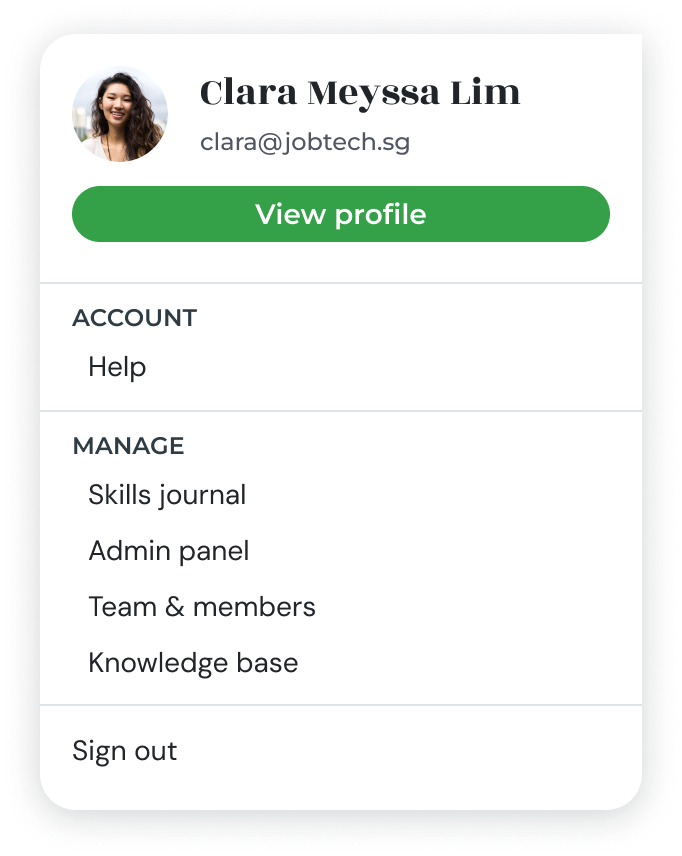
Click on your **profile menu** (avatar icon) in the top-right corner and select [**Help**](https://app.betalented.ai/help).
 ## Knowledge base
Browse or search a library of help articles covering common tasks and frequently asked questions. Use the search bar to find articles related to your query.
## Submit feedback or a support ticket
If you cannot find an answer in the knowledge base:
Click **Send Feedback** or **Report an Issue** from the Help section.
Provide a clear description of the problem or feedback. Include relevant details such as the page you were on and what you expected to happen.
Click **Submit** to send your ticket to the support team. You will receive a confirmation and follow-up via email.
## Knowledge base
Browse or search a library of help articles covering common tasks and frequently asked questions. Use the search bar to find articles related to your query.
## Submit feedback or a support ticket
If you cannot find an answer in the knowledge base:
Click **Send Feedback** or **Report an Issue** from the Help section.
Provide a clear description of the problem or feedback. Include relevant details such as the page you were on and what you expected to happen.
Click **Submit** to send your ticket to the support team. You will receive a confirmation and follow-up via email.