> ## Documentation Index
> Fetch the complete documentation index at: https://support.betalented.ai/llms.txt
> Use this file to discover all available pages before exploring further.
# Navigating your homepage
> Welcome to your Talented. This guide will help you navigate the primary menus and modules available to manage your professional growth and recruitment needs.
### Main Navigation Bar
Located at the top of your screen, the main navigation bar is your gateway to all core features:
 1. **Home:** View your personalized dashboard, including skill summaries and course recommendations.
2. **Career Insights:** Access comprehensive overviews of skills needed for specific roles and visualize your career pathways.
3. **Learn:** Explore internal and external courses curated to bridge your identified skill gaps.
4. **Jobs:** View and apply for internal job openings within your organization.
5. **Gigs:** Browse short-term projects and internal assignments.
6. **Mentorship:** Connect with mentors or register as a mentee to facilitate knowledge sharing.
7. **Hub menu:** Serves as the central switching station within the platform, allowing you to move between different features of Talented.
8. **Bookmarks:** Quick access to all the courses and job openings you have saved for later.
9. **Notifications:** Stay updated on application statuses, new recommendations, and platform alerts.
10. **Profile menu:** Place where you can manage your account and administrative settings.
> **Note:** If certain modules like Gigs or Mentorship are not visible, please contact our customer success representative to enable them or [Schedule a demo](https://calendly.com/jobtech/30min).
***
### The Hub Menu
1. **Home:** View your personalized dashboard, including skill summaries and course recommendations.
2. **Career Insights:** Access comprehensive overviews of skills needed for specific roles and visualize your career pathways.
3. **Learn:** Explore internal and external courses curated to bridge your identified skill gaps.
4. **Jobs:** View and apply for internal job openings within your organization.
5. **Gigs:** Browse short-term projects and internal assignments.
6. **Mentorship:** Connect with mentors or register as a mentee to facilitate knowledge sharing.
7. **Hub menu:** Serves as the central switching station within the platform, allowing you to move between different features of Talented.
8. **Bookmarks:** Quick access to all the courses and job openings you have saved for later.
9. **Notifications:** Stay updated on application statuses, new recommendations, and platform alerts.
10. **Profile menu:** Place where you can manage your account and administrative settings.
> **Note:** If certain modules like Gigs or Mentorship are not visible, please contact our customer success representative to enable them or [Schedule a demo](https://calendly.com/jobtech/30min).
***
### The Hub Menu
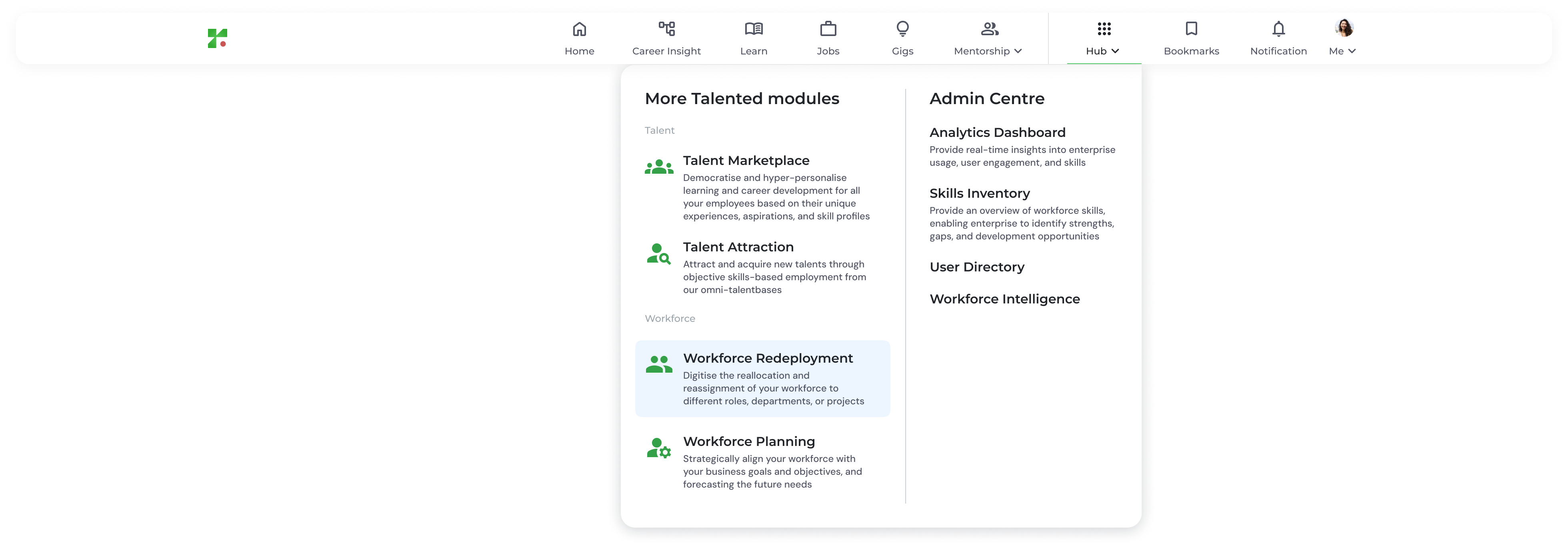 The **Hub** (represented by the grid icon) acts as a central switching station between different TalentTrack+ modules:
* **Talent Marketplace:** Access personalized learning and career development tools based on your unique profile.
* **Talent Attraction:** (For HR/Managers) Manage job postings and acquire new talent through skills-based matching.
* **Workforce Redeployment:** Strategically reassign and reallocate employees to different roles or projects.
* **Workforce Planning:** Align your human capital with future business goals and forecasting needs.
* **Analytics Dashboard:** Provide real-time insights into enterprise usage, user engagement, and skills
* **Skills Inventory:** Provide an overview of workforce skills, enabling enterprise to identify strengths, gaps, and development opportunities
* **User Directory:** A centralized, digital database used to view employee information and provide a real-time, skills-first overview of your organization's entire workforce.
* **Workforce Intelligence:** Place where you can download all your organisation's insight for Talented Platform.
***
### Your Personal Menu
The **Hub** (represented by the grid icon) acts as a central switching station between different TalentTrack+ modules:
* **Talent Marketplace:** Access personalized learning and career development tools based on your unique profile.
* **Talent Attraction:** (For HR/Managers) Manage job postings and acquire new talent through skills-based matching.
* **Workforce Redeployment:** Strategically reassign and reallocate employees to different roles or projects.
* **Workforce Planning:** Align your human capital with future business goals and forecasting needs.
* **Analytics Dashboard:** Provide real-time insights into enterprise usage, user engagement, and skills
* **Skills Inventory:** Provide an overview of workforce skills, enabling enterprise to identify strengths, gaps, and development opportunities
* **User Directory:** A centralized, digital database used to view employee information and provide a real-time, skills-first overview of your organization's entire workforce.
* **Workforce Intelligence:** Place where you can download all your organisation's insight for Talented Platform.
***
### Your Personal Menu
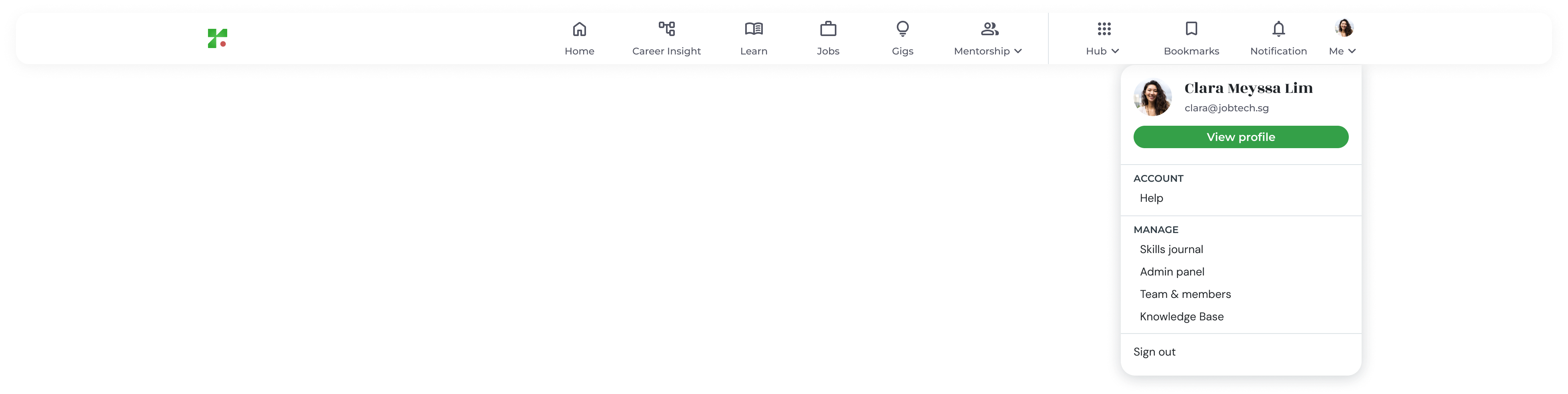 Located on the far right of the navigation bar, the **Profile Menu** allows you to manage your account and administrative settings:
* **View Profile:** Update your professional summary, skills journal, and profile picture.
* **Help:** Submit a support request or report technical issues.
* **Admin Panel:** (For Administrators) Access user management, organization settings, and job architecture configurations.
* **Skills Journal:** A personalized timeline that automatically documents your professional development, including every skill added, verified, or updated in your profile over time.
* **Knowledge Base:** This menu will redirect user to this guide website.
* **Team & members:** This feature allows you to view your team's skills profiles, track their onboarding progress, and share personalized learning recommendations to support their professional growth.
* **Sign Out:** Securely exit your TalentTrack+ session.
Located on the far right of the navigation bar, the **Profile Menu** allows you to manage your account and administrative settings:
* **View Profile:** Update your professional summary, skills journal, and profile picture.
* **Help:** Submit a support request or report technical issues.
* **Admin Panel:** (For Administrators) Access user management, organization settings, and job architecture configurations.
* **Skills Journal:** A personalized timeline that automatically documents your professional development, including every skill added, verified, or updated in your profile over time.
* **Knowledge Base:** This menu will redirect user to this guide website.
* **Team & members:** This feature allows you to view your team's skills profiles, track their onboarding progress, and share personalized learning recommendations to support their professional growth.
* **Sign Out:** Securely exit your TalentTrack+ session.