Main Navigation Bar
Located at the top of your screen, the main navigation bar is your gateway to all core features:
- Home: View your personalized dashboard, including skill summaries and course recommendations.
- Career Insights: Access comprehensive overviews of skills needed for specific roles and visualize your career pathways.
- Learn: Explore internal and external courses curated to bridge your identified skill gaps.
- Jobs: View and apply for internal job openings within your organization.
- Gigs: Browse short-term projects and internal assignments.
- Mentorship: Connect with mentors or register as a mentee to facilitate knowledge sharing.
- Hub menu: Serves as the central switching station within the platform, allowing you to move between different features of Talented.
- Bookmarks: Quick access to all the courses and job openings you have saved for later.
- Notifications: Stay updated on application statuses, new recommendations, and platform alerts.
- Profile menu: Place where you can manage your account and administrative settings.
Note: If certain modules like Gigs or Mentorship are not visible, please contact our customer success representative to enable them or Schedule a demo.
The Hub Menu
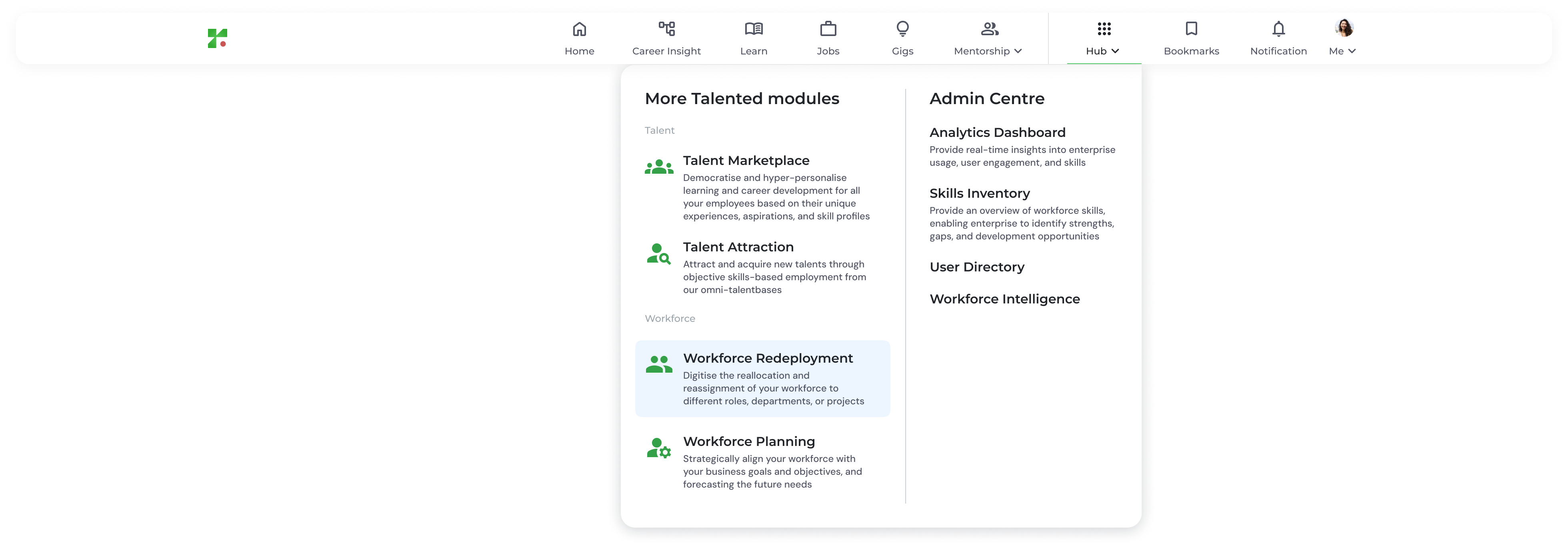
- Talent Marketplace: Access personalized learning and career development tools based on your unique profile.
- Talent Attraction: (For HR/Managers) Manage job postings and acquire new talent through skills-based matching.
- Workforce Redeployment: Strategically reassign and reallocate employees to different roles or projects.
- Workforce Planning: Align your human capital with future business goals and forecasting needs.
- Analytics Dashboard: Provide real-time insights into enterprise usage, user engagement, and skills
- Skills Inventory: Provide an overview of workforce skills, enabling enterprise to identify strengths, gaps, and development opportunities
- User Directory: A centralized, digital database used to view employee information and provide a real-time, skills-first overview of your organization’s entire workforce.
- Workforce Intelligence: Place where you can download all your organisation’s insight for Talented Platform.
Your Personal Menu
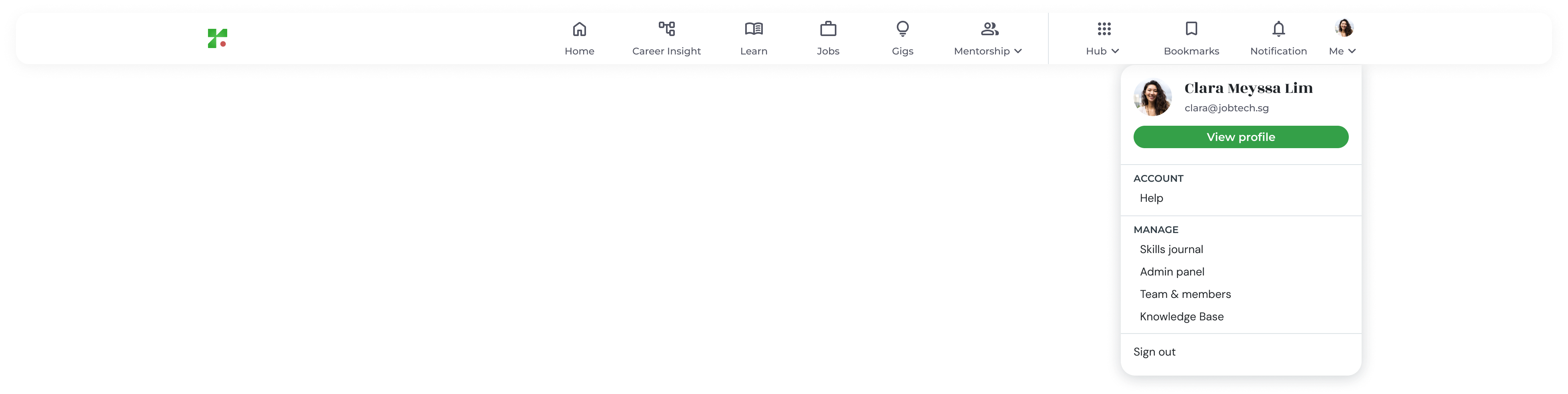
- View Profile: Update your professional summary, skills journal, and profile picture.
- Help: Submit a support request or report technical issues.
- Admin Panel: (For Administrators) Access user management, organization settings, and job architecture configurations.
- Skills Journal: A personalized timeline that automatically documents your professional development, including every skill added, verified, or updated in your profile over time.
- Knowledge Base: This menu will redirect user to this guide website.
- Team & members: This feature allows you to view your team’s skills profiles, track their onboarding progress, and share personalized learning recommendations to support their professional growth.
- Sign Out: Securely exit your TalentTrack+ session.